Source Audio Encounter Delay & Reverb
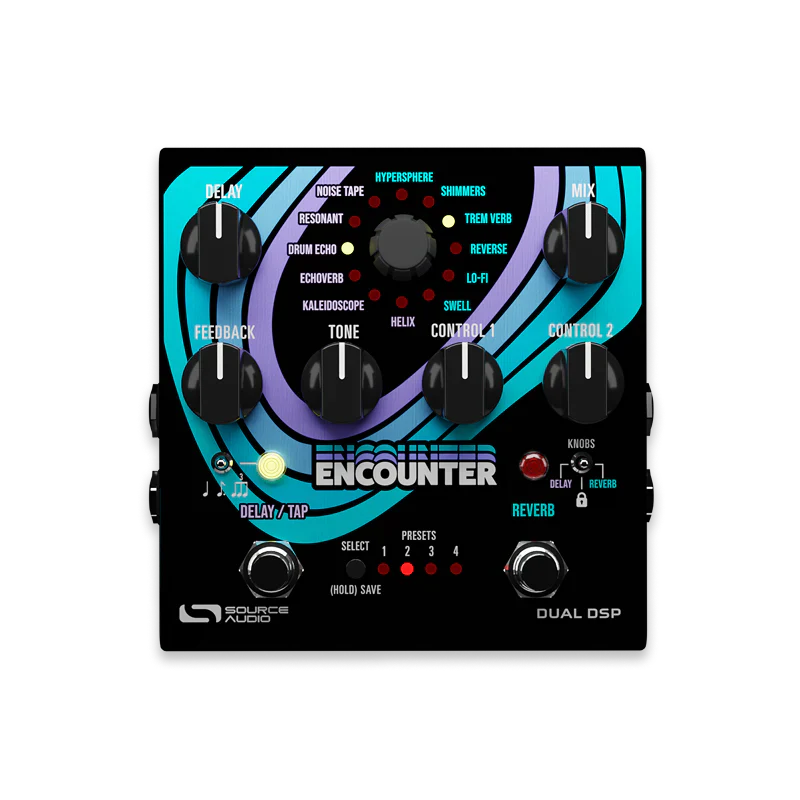
The Encounter Ambient Delay+Reverb is a fully-loaded vessel of atmospheric discovery, thoughtfully designed to explore swirling celestial tones and deeply immersive soundscapes
128 Presets Memory
8 presets accessible via the pedal controls & 128 presets available via MIDI.
Stereo I/O
Create a lush stereo spread with true stereo inputs and outputs.
Universal Bypass™
Select between high-quality signal relays for true or soft bypass and transparent buffers for analog bypass.
Analog Dry Through
The instrument’s dry signal remains completely unprocessed, maintaining a 100% pure analog signal path that runs alongside the pedal’s delay effects.
Dedicated Footswitches
The left footswitch is the ON/OFF for the delay. The right footswitch is the ON/Off for the reverb.
TapTempo Switch
The left switch also provides tap tempo when the delay is engaged.
Knobs “Lock” Switch
Flip the KNOBS switch to the center position to lock your controls in place, protecting your settings from accidental bumps in a live setting.
|
|
|
|
|
|
|
|
|
|
|
|
|
|
Original: $525.04
-70%$525.04
$157.51Product Information
Product Information
Shipping & Returns
Shipping & Returns
Description
The Encounter Ambient Delay+Reverb is a fully-loaded vessel of atmospheric discovery, thoughtfully designed to explore swirling celestial tones and deeply immersive soundscapes
128 Presets Memory
8 presets accessible via the pedal controls & 128 presets available via MIDI.
Stereo I/O
Create a lush stereo spread with true stereo inputs and outputs.
Universal Bypass™
Select between high-quality signal relays for true or soft bypass and transparent buffers for analog bypass.
Analog Dry Through
The instrument’s dry signal remains completely unprocessed, maintaining a 100% pure analog signal path that runs alongside the pedal’s delay effects.
Dedicated Footswitches
The left footswitch is the ON/OFF for the delay. The right footswitch is the ON/Off for the reverb.
TapTempo Switch
The left switch also provides tap tempo when the delay is engaged.
Knobs “Lock” Switch
Flip the KNOBS switch to the center position to lock your controls in place, protecting your settings from accidental bumps in a live setting.
|
|
|
|
|
|
|
|
|
|
|
|
|
|